

Quiz Designers and Quiz Results and Scores Access users that have been assigned to Quiz Categories will be able to see scores of the quiz’s audience.
View Quiz Results
Reports
Users can run quiz reports either by going directly to the policy to which a quiz is attached, or go to the Reports button in the tool bar of any Policies component.
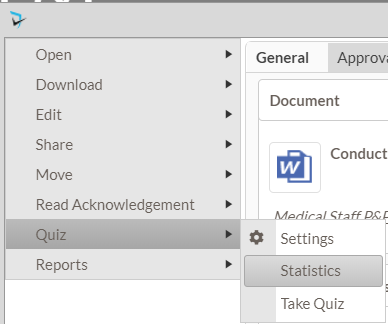
To run a report of quiz results for a quiz that is attached to a specific policy, the user will first navigate to that policy. Open the document menu ( ), select Quiz, then Statistics.
Quiz Results and Score Viewers can also go to the Reports button in the Policies component’s toolbar.
Quiz related reports here include:
- Quiz Answers By User – Displays each quiz a user has taken with the questions and answers.
- Quiz Average Score by Quiz – Show average overall score for each quiz version matching criteria with total attempts, total attempts passed, total attempts failed, total incomplete
- Quiz Pending by Document – Listing of pending quizzes grouped by Document. Can be generated in printable or excel formats.
- Quiz Pending by User – Listing of pending quizzes grouped by user. Can be generated in printable or excel formats.
- Quiz Score by Document – Report displays pending and recorded quiz scoring by document title.
- Quiz Score by User -Quiz scoring by users with status.
Quiz Statistics
The Quiz Statistics report, accessed from the document menu, displays the quiz status, number of attempts, score, and last attempt date for all users required to complete the quiz, as well as overall statistics for the quiz.
Users can filter the display as well, to only show Passed, Pending, Failed, and Exempt audience members.
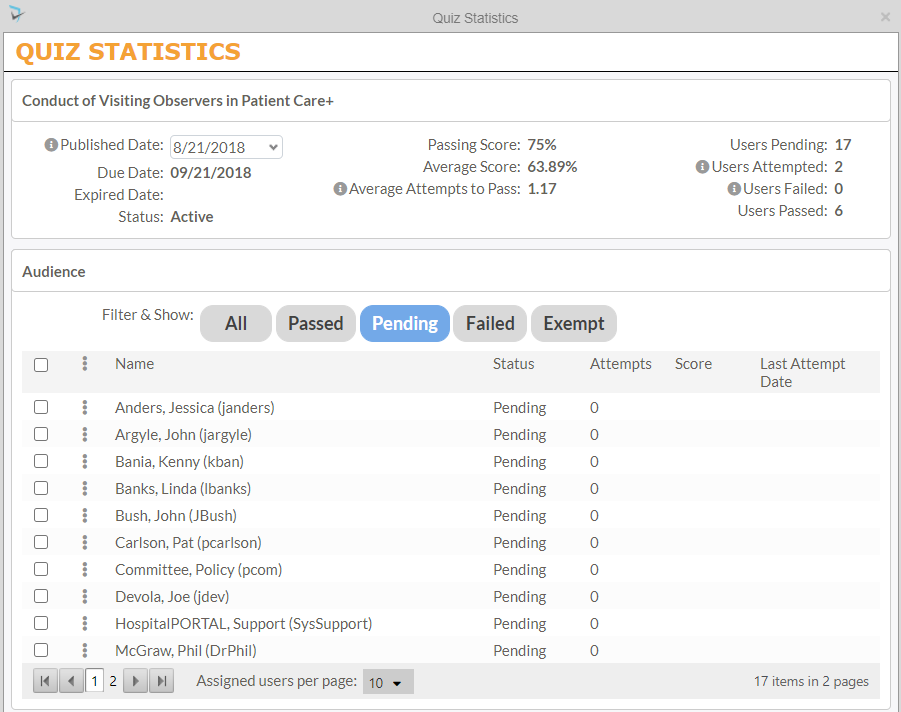
By clicking the three dot icon next to the names of the audience members, users can then choose to send an email notification to all selected pending quiz takers by selecting Notify via Email. Audience members can also be marked as exempt on this menu if thy do not need to complete the quiz.
Managing Quizzes & Results as Quiz Designer
Quiz Designers have even more options and abilities to manage quizzes and quiz attempts. Quiz designers can…
- View Status of each person’s quizzes, attempts, scores and completed date.
- Reset attempts if the user reached the limit
- Mark audience members as Exempt from taking the quiz
- Send reminder emails to audience members that haven’t passed the quiz yet
Post your comment on this topic.