

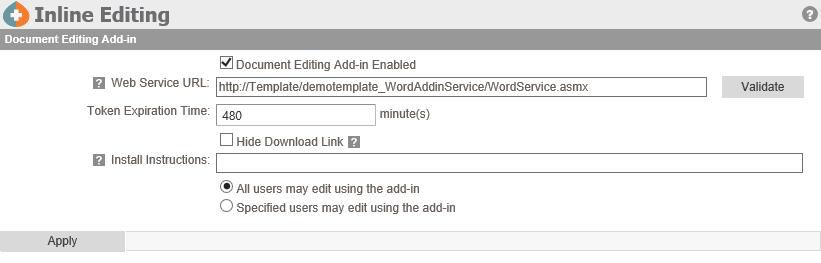
On the Inline Editing page of the Administration Menu, administrators can turn on and setup the inline editing service for your P&P’s. This is different from the actual Word Add-in.
Enable inline editing by checking the checkbox labeled, Document Editing Add-in Enabled.
The Web Service URL will be configured for you and should be left for product support to edit.
The Token Expiration Time will determine how long you can have a document open using Inline Editing until it times out and you cannot save it back to the policy manager. It is pre set to 8 hours.
The checkbox, Hide Download Link can be checked if you do not allow end users to install programs such as the Inline Editing Word Add-in that needs to be installed on each computer that will be used to author policies.
You may also specify Install Instructions that apply to your organizations policies.
By selecting the Specified users and roles that may edit using the add-in radio button will only allow specified users and roles to use Inline Editing. When selecting this radio button a list selector with a list of users to choose from. From the list, double click on the individuals or roles that should be able to use this feature.
Post your comment on this topic.