

Workflow
The controlled process of publishing documents in the Policy and Procedure component separates all the document publishing steps into separate phases: Setup, Authoring, Expert Review, Approval, and Publishing. Users must be set up as members of designated user roles before they can perform any of the document management steps. Typically the process of publishing a document in the Policy and Procedure component involves the following steps:
| Section | Description |
|---|---|
| Setup | During this stage the Moderator is responsible for configuring the document settings including the Title, Description, Reminder Date, Review Due Date, and users responsible for collaboration on the document. The Moderator may also upload a document for Authoring. |
| Authoring | Stage in which the document undergoes revision by the Lead Author & Co-authors assigned to the document. This stage completes once the Lead Author uploads a revision and clicks the Submit to Expert Review or Submit to Approval buttons. |
| Expert Review | Optional stage in which persons impacted by the document may review and decline the document prior to being sent for Approval. The Action Pane will show a Decline button for any Expert Reviewer that opens the draft screen. This stage completes once the specified number of days elapse or an Expert Reviewer declines the draft. There is an option in the Document Settings/P&P Setup that will move the document to the Approval step once all Expert Reviewers accepts the policy. |
| Approval | Stage at which approvers may Approve or Decline the document. This stage completes once ALL of the approvers approve the document, or an approver declines the document sending it back to the authors and the authoring stage. |
| Publishing | This is the final stage in the draft process if the draft will be published immediately. The Moderator can review the document as well as the collaboration and finalize Effective Dates for the document. They will also be able to replace the document for any last minute changes. If the Moderator selects to publish the document, the document will be published and immediately available to everyone. If the Moderator chooses to publish the document at a later date, the document will enter the Pending stage. |
| Pending | This stage indicates that the document approval and publishing are complete and the document is Pending the Effective Date. The Moderator will still be able to open the draft and choose to send back to the authors if changes are required, or publish the document immediately. The document will automatically be visible to the Viewers upon reaching its Effective Date. |
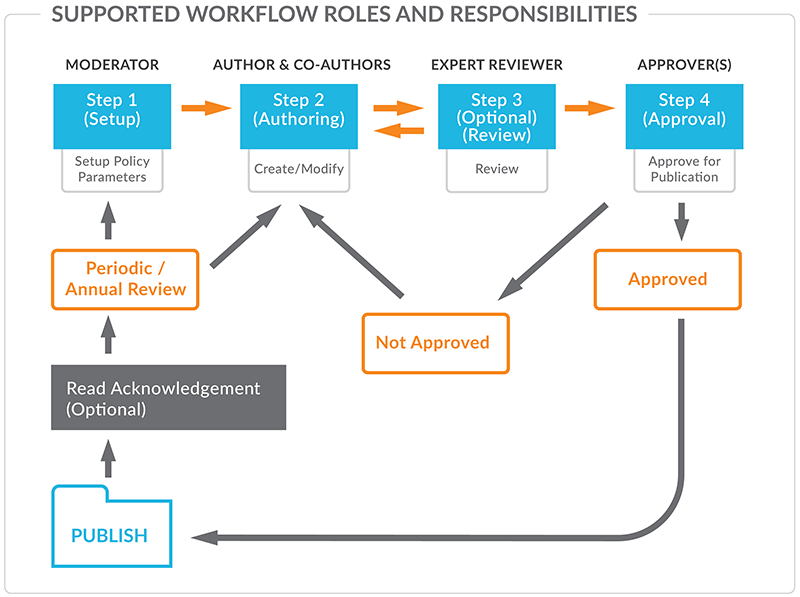
The system automatically moves the documents between the steps based on the action of the user (i.e. upon approval of the final document by the approvers, the system locks down the approval function and generates reminders to the moderator to complete the Publishing step). This feature eliminates the need for manual tracking and review of document statuses.
The built-in revision control logic automatically archives the prior version of the document along with its collaboration notes and user action audit trail. The authorized users can always access the prior version of any document stored at any point of time in the P&P component.
Roles and Responsibilities
| Role Name | Description |
|---|---|
| Moderators | User(s) responsible for creating and configuring the document placeholders and/or folders in the tree and overseeing the document collaboration process. Moderators may upload initial documents for Authoring and start revisions. Moderators are also responsible for the Publishing step, which can include adding additional description and editing the title of the document. |
| Lead Author | User responsible for authoring documents and submitting documents for Expert Review/Approval. Lead Author can also begin revision of currently published documents and modify certain document settings such as Keywords. Lead Authors can also upload a document in draft mode |
| Co-Author | Optional user(s) responsible for collaborating with the Lead Author on a document. Co-authors can post messages and upload documents for the Lead Author to review, however they cannot submit documents for Expert Review and/or Approval. |
| Expert Reviewers | Optional user(s) responsible for reviewing documents before being sent for approval. Expert Reviewers can decline a document within the defined review period and provide feedback to the Lead Author and Co-authors. (Examples: Hospital wide polices may require review to allow different affected departments to provide feedback prior to approval) |
| Approvers | User(s) responsible for Approving or Declining documents. If a document is declined, Approvers must provide comments to the Lead Author and Co-authors. All Approvers must approve a document before it may be published. |
| Viewers | User Role(s) that have rights to view the document or folder. |
| Policy Readers | Group(s) or User(s) that will be required to read the document when published or revised |
Post your comment on this topic.