

Document shortcuts are used to display a document that is managed in another document set. The document shortcut will display the most current version of the document from the host Policy and Procedure component.
Setup
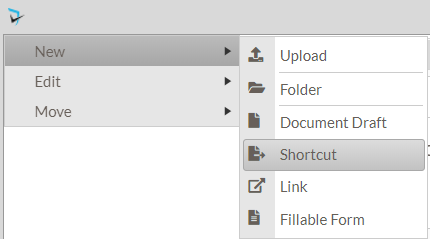
- Navigate to the folder where the shortcut will be added added and open the folder menu. Select New, then select Shortcut.
![]()
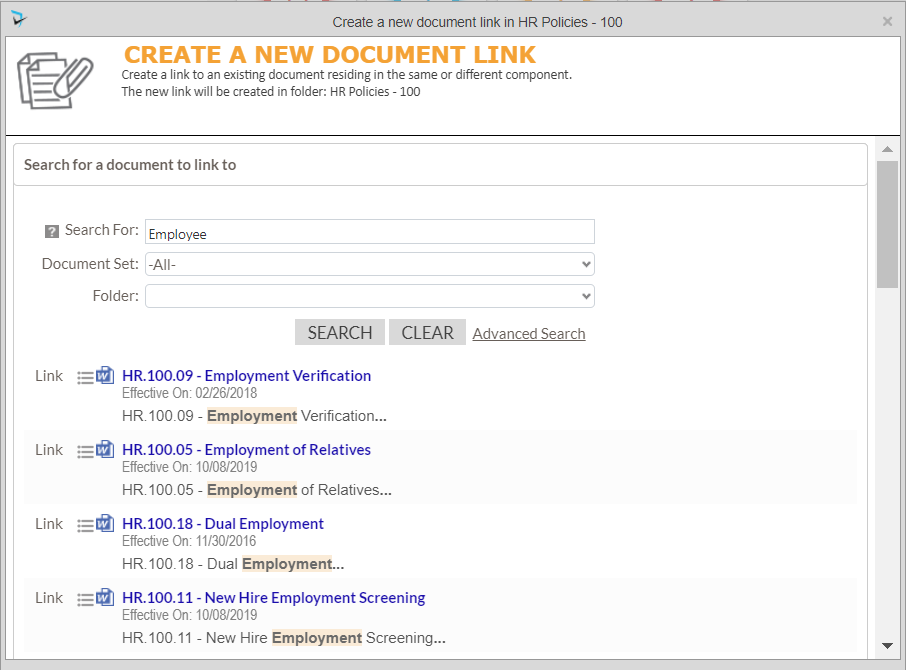
- The Create a New Document Link screen is displayed. Users can search for the document to link to. The document must be indexed to make documents searchable, so running the Crawler might be required. The search can be filtered by the component and/or folder in which the document resides. You can also search by document title, body content or keywords.
![]()
- Click “Link” to create the shortcut in the new location. Shortcut icons are shown with an arrow.
![]()
- Click on the “x” in the upper right corner of the popup to close.

Last modified:
Jul 10, 2023
Post your comment on this topic.