

Only users within the [Admin – Applications] (App Admins) security role (App Admins) can create a new forum. To create a new Forum:
- Click on the Administration Gear (
![]() ) at the top right of the page.
) at the top right of the page. - In the left menu, hover over Content & Pages and select Components.
- You will see a list of “components”. Click on the pencil icon (
![]() ) next to Forum.
) next to Forum. - You will be brought to the Manage Forum Categories page. From here click on the New icon (
![]() ) labeled Add New Forum.
) labeled Add New Forum. - You will be brought to the Configure Forum Category page. Here you will need to determine the Forum Title.
- Make sure that the Active checkbox is checked
- If you want some to approve posts before they are published to the end users, check the Require Approval checkbox.
- Now you are ready to determine the roles that will have different permissions in the forum:
- Post Roles – Choose the security roles that will be able to create new post and reply to others. Choose [Anonymous] and [Authenticated] if you want everyone to be able to post to the forum.
- View Roles – Choose the security roles that will be able to read the posts and replies. Choose [Anonymous] and [Authenticated] if you want everyone to be able to post to the forum.
- Moderator Roles – This would be the security role that would be responsible for approving posts before they are published to the groups listed as View Roles.
- Forum Subscribers – These are individual users that will get an email notification whenever someone posts to the forum.
- Click Apply & Close at the bottom of the page to save your changes.
 ) at the top right of the page.
 ) next to Forum.
 ) labeled Add New Forum.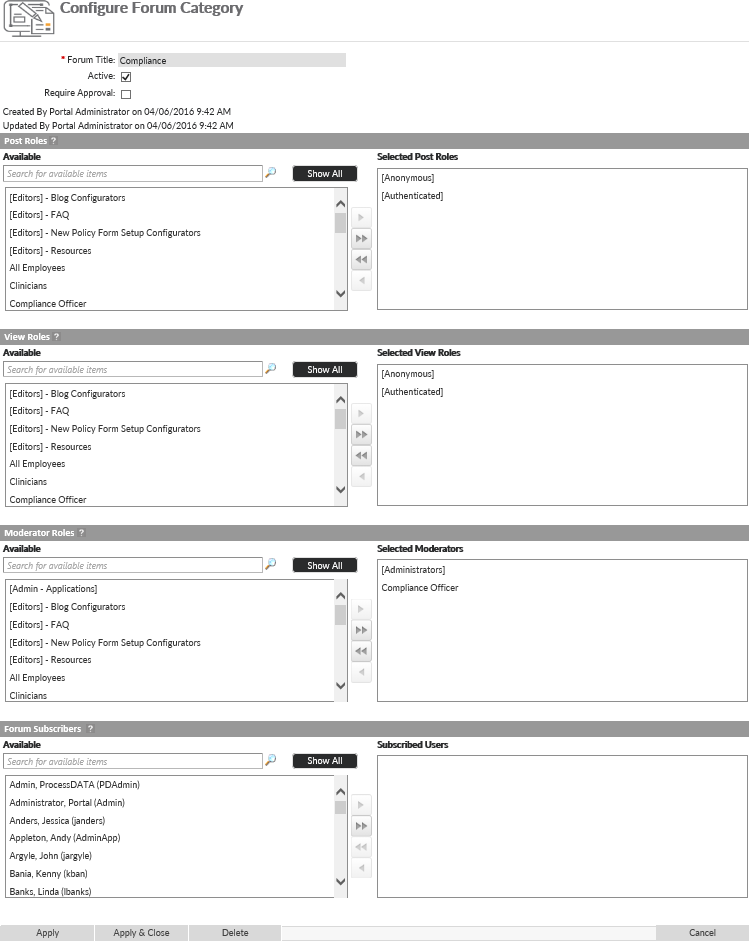
Last modified:
Jul 10, 2023
Post your comment on this topic.