

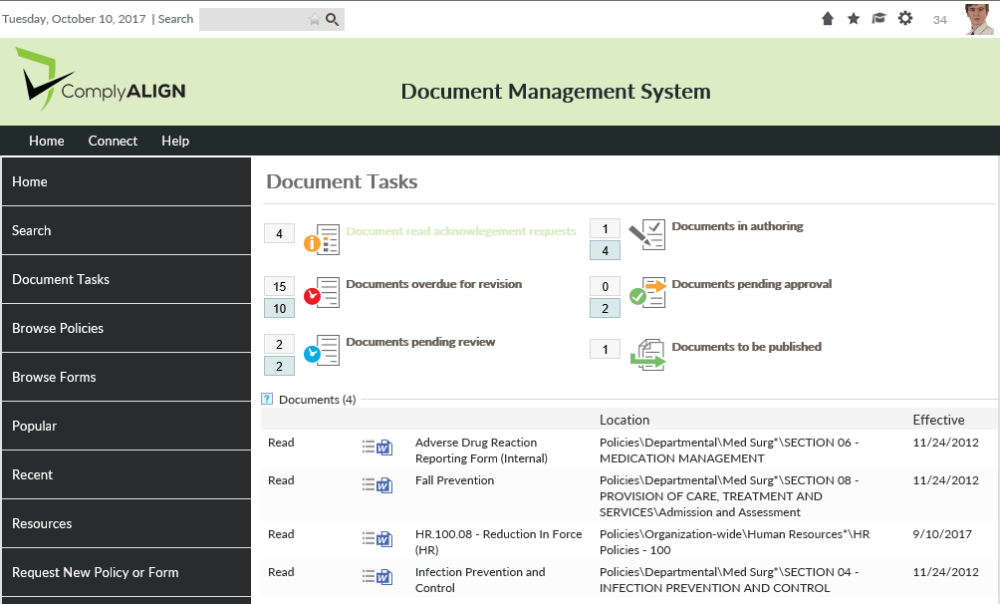
The Document Tasks page displays policies that need a user’s action. When a user who is assigned to a role in a Policies and Procedures component logs in and visits this page, they will see a list of documents that are split up into different sections for each step in the P&P workflow and other P&P related tasks such as read acknowledgements.
The top of the page displays each type of action that the authenticated user has documents in. To the left of each action is a count of the documents that require that action. If the user is a moderator, a second number might show in blue. This is the number of documents that are in this step that the user is a moderator for but not explicitly assigned to that step.
Clicking each action will display the documents in a gird format in the bottom section. The first column in the grid will have a link for each document which will take the user to the revision or draft screen where the action can be preformed. The user can also click on the Document Menu ( ) next to each document.
Post your comment on this topic.