

In order to send read acknowledgement request to users, Moderators must configure the acknowledgement on the document. Only Moderators or Administrators have access to configure read acknowledgements. The following steps takes you through setting up a policy read acknowledgement.
- Navigate to the policy to be configured.
- Click on the Document Menu (
![]() ) and select Read Acknowledgement, then Settings.
) and select Read Acknowledgement, then Settings.
 ) and select Read Acknowledgement, then Settings.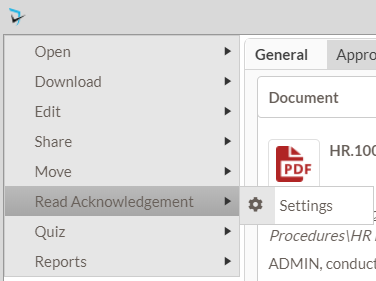
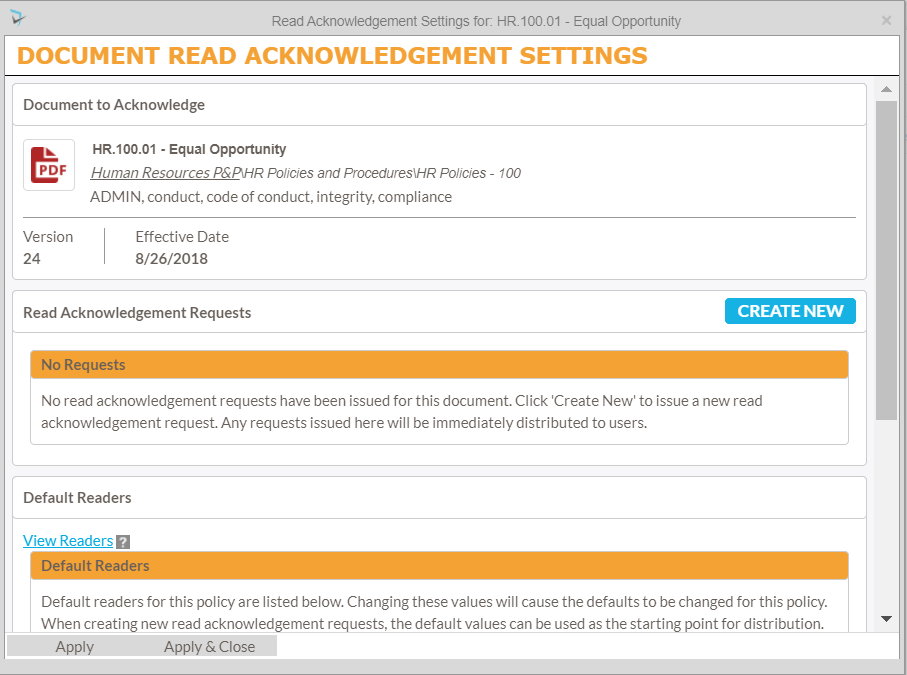
- The Document Read Acknowledgement Settings popup will be displayed. Click on the Create New button to add a new request.
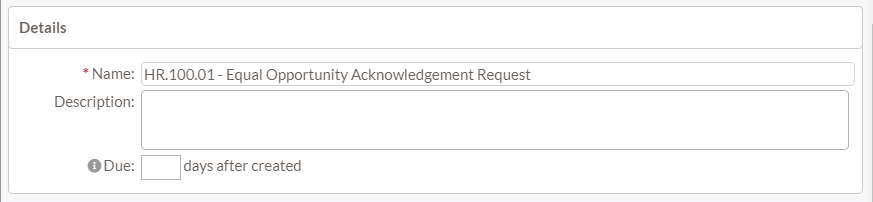
Details
- Name – Moderators can give their read acknowledgement a name (ie. Managers’ Acknowledgements, Nursing Acknowledgements, etc).
- Description – Moderators may also provide a description (optional).
- Due – The acknowledgement request will be due to be completed within the number of days specified after being assigned.
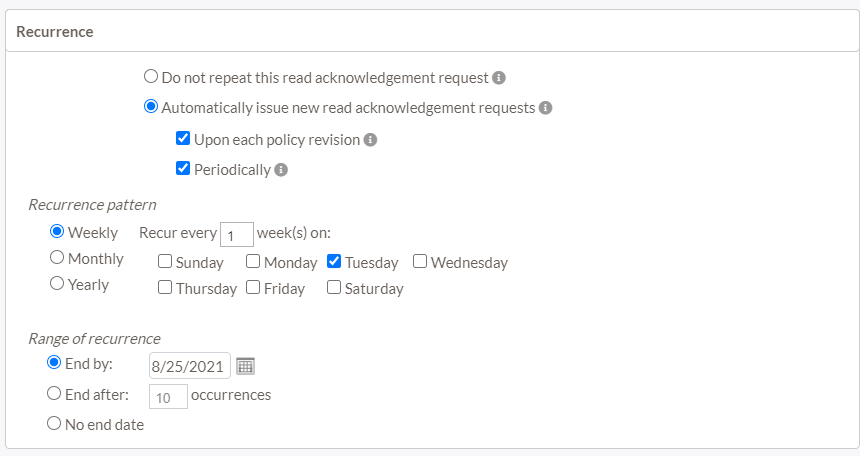
Recurrence
- Moderators must select if and when the read acknowledgements need to be repeated.
- Do not repeat this read acknowledgment request – Indicates this is a one-time request. No future requests will automatically issued
- Automatically issue new read acknowledgement requests – Indicates this is a recurring request. Future requests will be automatically issued based on the configuration in the options below:
- Upon each policy revision – A new request will be automatically issued when a new revision is published.
- Periodically – A new request will be automatically issued in regular intervals including weekly, monthly, and yearly. Moderators can also choose when the recurrence ends.
Readers
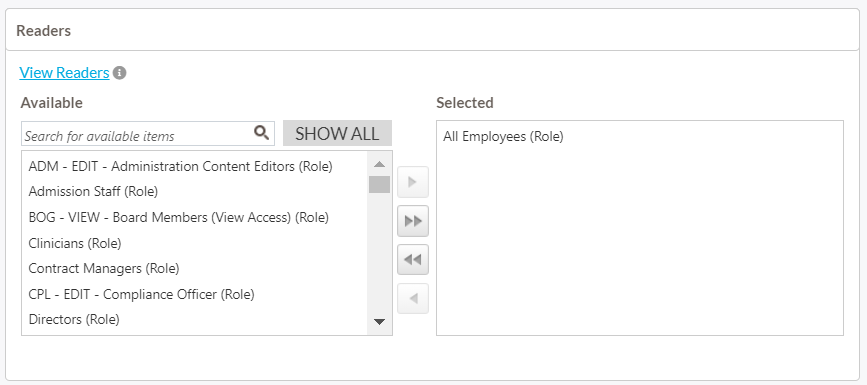
- Moderators can select who will be receiving the read acknowledgement requests and options regarding those readers.
Options
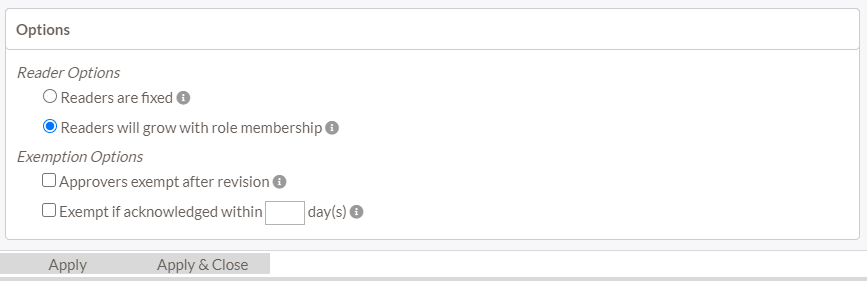
- Reader Options – Moderators can choose whether the readers list will be fixed or grow/shrink with role membership changes. If the moderator chooses Fixed then the list of individual users will stay the same as the day the read acknowledgment was created. If the moderator chooses Readers will grow with role membership then when someone is added to one of the selected security roles, then the readers list will change to reflect that addition.
- Exemption Options
- Approvers exempt after revision – Approvers who have approved the policy will be exempt for the initial read acknowledgement for the policy revision. Approvers will be required to acknowledge reading the policy for subsequent requests.
- Exempt if acknowledged within x number of day(s) – Users will be exempt from the read acknowledgement if they have acknowledged the same version of the policy within the number of days specified.
- Click Apply & Close to save changes.
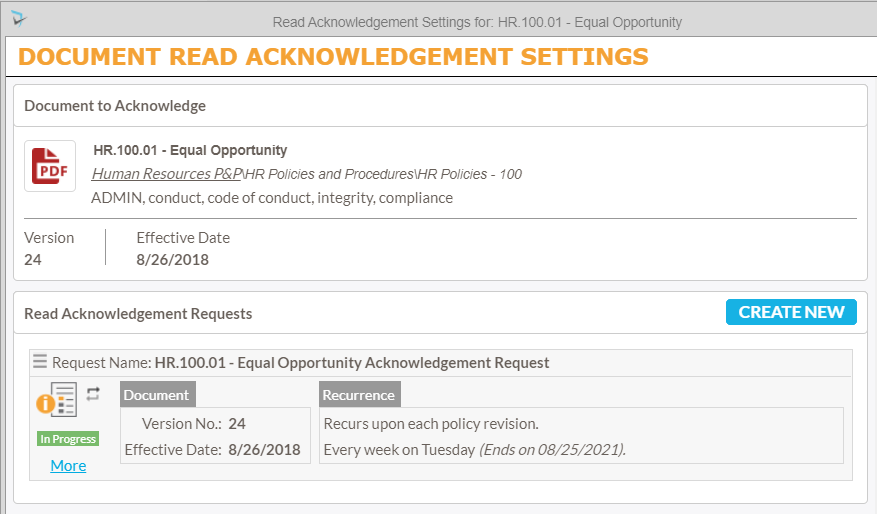
After saving a read acknowledgment, moderators will see it in the Document Read Acknowledgement Settings. Each acknowledgement request will have Document version number, an effective date, and recurrence, if applicable.
By clicking on More below the icon will display statistics including start/end dates, assigned readers, pending readers, completed, exempt and what version number it was for. By clicking on the menu for the request ( ) moderators can access options to Edit, Copy, or disable the request.
Post your comment on this topic.